
The FlowTraq upgrade process must achieve the goal of upgrading each of the major components (the FlowTraq server and the Web interface files). In a cluster, all FlowTraq servers must be upgraded. In general, to ensure correct operation the FlowTraq server is upgraded first (wherever needed), followed by the Web interface.
![[Note]](../common/images/admon/note.png) | Note |
|---|---|
During the upgrade process, portions of the FlowTraq service will be unavailable. In particular, any FlowTraq server directly receiving flow data will be unable to receive and process those flows during the brief time in which the service is being shut down and replaced. Typically, this process is only a few minutes, but should be timed in order to minimize the impact of the outage. When upgrading a cluster, individual workers should be upgraded separately rather than all at once. This allows the FlowTraq portal to load-balance around them. While workers are offline, queries will return slowly and with potentially incomplete data. It is strongly recommended to notify all end users before upgrading for this reason. |
Upgrading from FlowTraq Q2/15 or earlier to a later version of FlowTraq (Q3/15 or later) involves a one-time set of extra steps that were previously unnecessary. If you are upgrading from an early version, please contact FlowTraq support for details.
The FlowTraq virtual appliance update routine is simple, and performs the recommended steps of a web portal upgrade automatically. Log into the virtual appliance console, and select upgrade from the main menu.
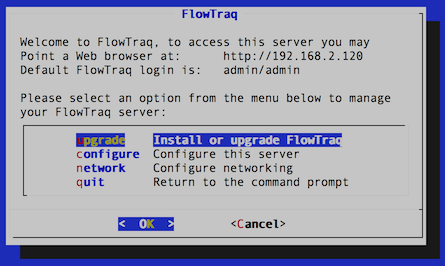
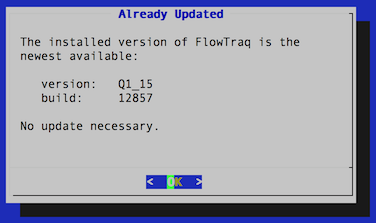
The upgrade routine will contact FlowTraq to determine the most recent release and download that release. If there is no new version available, the routine will display the current server version and then bring the user back to the main menu.
If a new version of FlowTraq is available, or a new build of the current release, selecting 'update' will trigger the upgrade routine. This will upgrade the FlowTraq server and FlowTraq Web, as well as download security updates to selected packages. This process should take less than five minutes on a typical Internet connection.
| Note |
|---|---|
When upgrading using the virtual appliance, it may be necessary to install the common CA certificates so that your system recognizes FlowTraq's credentials. If the update fails with an SSL warning, exit to the command line, enter the following command: apt-get install ca-certificates Then open flowtraq_setup.sh and try the upgrade again. |
To upgrade the Windows version of FlowTraq server, download the most recent install package and run it with executable permissions. The current configuration is retained and the new server daemon is started right away.
| Note |
|---|---|
In some circumstances, the Windows install routine may raise a notification that a reboot is required to finish installation. This is rarely the case. Log into FlowTraq and verify that the new version of the server is installed and running. Only if the version number has not updated is a reboot actually necessary. |
To upgrade the Mac OS version of FlowTraq server, download the most recent install package and run it with executable permissions. The current configuration is retained and the new server daemon is started right away.
Download the Mac OS installer (
FlowTraq-QX_XX-server-mac.sh.gz, whereQX_XXrepresents the current version of FlowTraq).Unzip the installer:
$ gunzip FlowTraq-QX_XX-server-mac.sh.gz
This produces
FlowTraq-QX_XX-server-mac.sh.Run the installer with superuser privileges, either by running as root or via
sudo:$ sudo sh FlowTraq-QX_XX-server-mac.sh
Press
[SPACE]to page through the license agreement, and typeYESwhen prompted to indicate your acceptance.
Like the upgrade processes for other systems, the upgrade is performed by downloading and running the install binaries. FlowTraq will detect the existing install and perform the necessary upgrade tasks, preserving the current configuration. To upgrade FlowTraq Server, take the following steps.
Download the universal Unix installer (
FlowTraq-QX_XX-server-unix.sh.gz, whereQX_XXrepresents the current version of FlowTraq).Unzip the installer:
$ gunzip FlowTraq-QX_XX-server-unix.sh.gz
This produces
FlowTraq-QX_XX-server-unix.sh.Run the installer with superuser privileges, either by running as root or via
sudo:$ sudo sh FlowTraq-QX_XX-server-unix.sh
Press
[SPACE]to page through the license agreement, and typeYESwhen prompted to indicate your acceptance.
Optional: Once the FlowTraq server is upgraded, the legacy standalone NBI service can be upgraded if desired. It is not necessary for most installations, which will rely on the built-in alerting functionality. At most one copy of FlowTraq NBI is needed per cluster, typically installed on the Portal node. The FlowTraq NBI service is upgraded in a similar way as the FlowTraq server.
Download the universal Unix installer (
FlowTraq-QX_XX-nbi-unix.sh.gz, whereQX_XXrepresents the current version of FlowTraq).Unzip the installer:
$ gunzip FlowTraq-QX_XX-nbi-unix.sh.gz
This produces
FlowTraq-QX_XX-nbi-unix.sh.Run the installer with superuser privileges, either by running as root or via
sudo:$ sudo sh FlowTraq-QX_XX-nbi-unix.sh
Press
[SPACE]to page through the license agreement, and typeYESwhen prompted to indicate your acceptance.
Finally, the FlowTraq Web UI is updated. This process is simple:
Download the FlowTraq Web tarfile (
FlowTraq-QX_XX-web.tar.gz, whereQX_XXrepresents the current version of FlowTraq).Copy the .tgz file to webhome (typically
/var/wwwor/var/html).Unzip the file in place, overwriting the
flowtraqdirectory:$ sudo tar -xzf FlowTraq-QX_XX-web.tar.gz
![[Caution]](../common/images/admon/caution.png) | Caution |
|---|---|
If any custom changes have been made to any of the files, they will be overwritten. It is generally not safe to simply back up and restore saved files, as changes to the UI may have introduced complications. |
